
What to Look for in a Gaming Motherboard: 9 Essential Features
When building a gaming PC, most people focus on the processor and graphics card. These components are important, but there is another part that connects almost everything inside your computer: the motherboard.
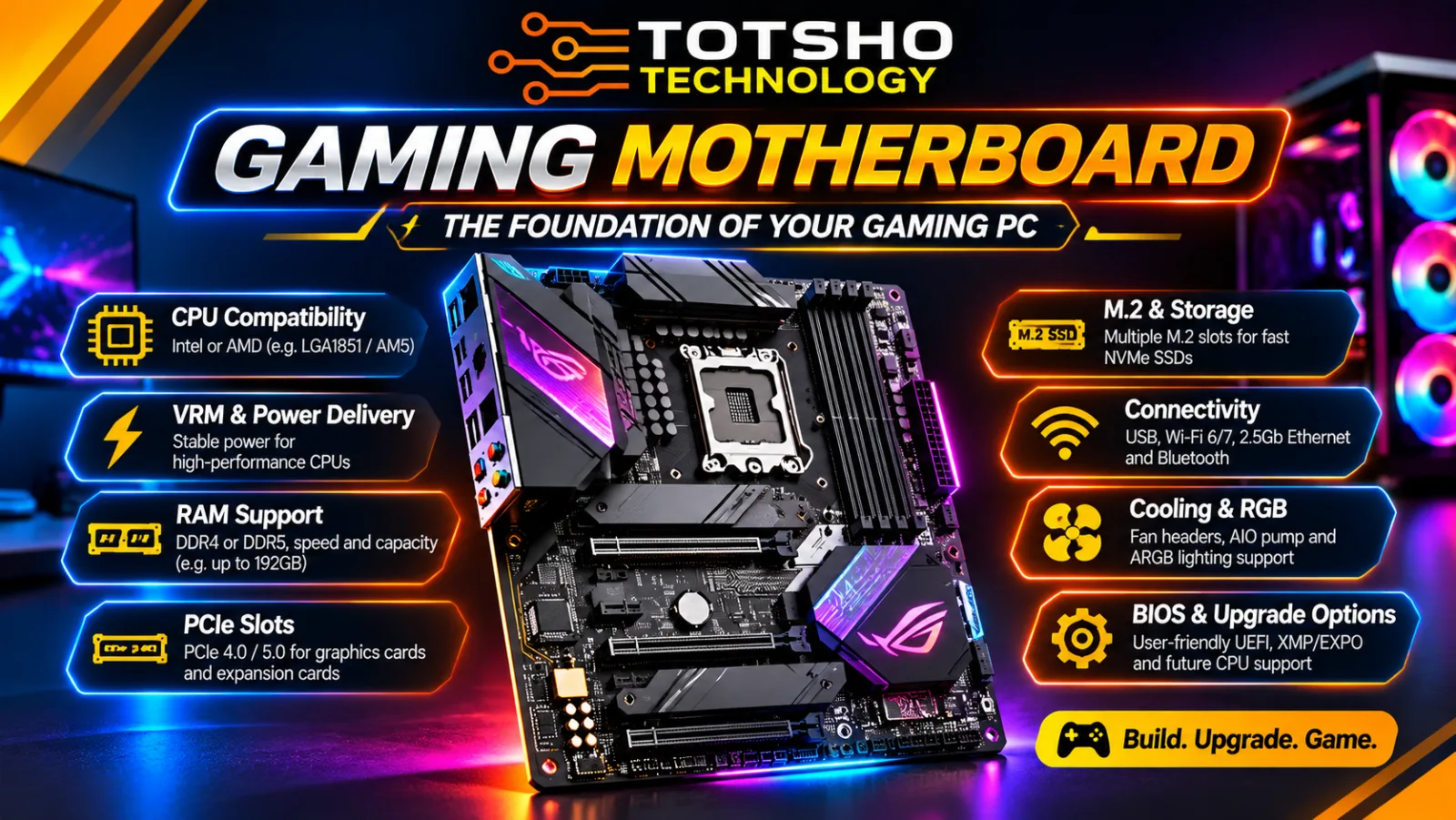
A motherboard is the main circuit board of a PC. It connects the processor, RAM, graphics card, storage drives, cooling system and other hardware components.
However, not all motherboards are the same. Some offer advanced connectivity, multiple M.2 SSD slots and powerful voltage regulation, while others provide only the essential features needed for a budget gaming build.
So, how do you choose the right motherboard?
At Totsho Technology, we have identified nine essential features you should check before purchasing a gaming motherboard.
1. CPU Socket and Chipset Compatibility
The first thing you should check is whether the motherboard supports your chosen processor.
A CPU must physically and electronically match the motherboard's processor socket. Intel and AMD use different sockets, and even processors from the same manufacturer may require different motherboard platforms.
For example:
AMD
- AM4: Supports selected Ryzen desktop processors, including many Ryzen 1000 to 5000 series models.
- AM5: Supports Ryzen 7000, 8000 and 9000 desktop processor families, with the required BIOS support.
Intel
- LGA1700: Supports selected 12th, 13th and 14th Generation Intel Core desktop processors.
- LGA1851: Used by Intel Core Ultra 200S desktop processors.
A processor designed for LGA1700 will not work in an LGA1851 motherboard.
The chipset also matters. It determines the motherboard's available features, including expansion connectivity, storage support and certain overclocking capabilities.
For example, AMD's B850 and X870 chipsets are designed for the AM5 platform, while Intel's Z890 and B860 chipsets support the LGA1851 desktop platform.
Buying tip: Never assume that a processor is compatible just because the motherboard has the correct brand. Check the manufacturer's CPU support list for the exact motherboard model and required BIOS version.
2. VRM and Power Delivery
Have you ever noticed the small metal heatsinks surrounding the CPU socket on a motherboard?
These often cover an important component called the Voltage Regulator Module (VRM).
The VRM regulates power supplied by the power supply and delivers the appropriate voltage to the processor.
This is important because modern processors can draw considerable power, especially during demanding workloads.
A motherboard with a suitable VRM design can provide stable power delivery and maintain performance under sustained workloads.
When comparing motherboards, look for:
- Quality VRM components.
- Adequate VRM heatsinks.
- A power-delivery design suitable for your processor.
- Appropriate CPU power connectors.
Do not choose a motherboard based only on the number of VRM phases advertised. The quality of the components, cooling and overall design also matter.
For an entry-level gaming PC, you generally do not need an expensive enthusiast motherboard. However, pairing a high-power processor with a motherboard that has inadequate power delivery can cause problems under sustained workloads.
3. RAM Support: DDR4 or DDR5?
Memory support is another important consideration.
Motherboards are designed for specific memory technologies. Depending on the platform, you may encounter DDR4 or DDR5 memory.
DDR5 is common on modern desktop platforms, including AMD AM5 and Intel LGA1851.
Before purchasing a motherboard, check:
Memory generation: Does it support DDR4 or DDR5?
Maximum capacity: How much RAM can the motherboard accommodate?
Number of DIMM slots: Does it have two or four memory slots?
Supported memory speeds: What speeds are officially supported, and what speeds are available through memory overclocking profiles?
Memory compatibility: Is your RAM kit listed in the motherboard manufacturer's qualified vendor list (QVL)?
For gaming, 16GB can still be sufficient for many titles, while 32GB is a sensible target for many modern gaming builds, multitasking and streaming.
Also remember that DDR4 and DDR5 are physically different. You cannot install DDR5 memory into a DDR4 motherboard or vice versa.
Buying tip: Check both the motherboard specifications and the processor's supported memory specifications before purchasing your RAM.
4. PCIe Slots and Graphics Card Support
One of the most important features of a gaming motherboard is its PCI Express (PCIe) expansion slots.
Your graphics card normally uses the primary PCIe x16 slot.
PCIe provides the high-speed connection between components such as:
- Graphics cards.
- NVMe SSDs.
- Network cards.
- Capture cards.
- Sound cards.
- Other expansion devices.
When choosing a motherboard, pay attention to the PCIe generation.
Common generations include:
- PCIe 3.0
- PCIe 4.0
- PCIe 5.0
Each newer generation provides higher bandwidth per lane.
For example, PCIe 5.0 offers approximately twice the bandwidth per lane compared with PCIe 4.0.
Does this mean you must buy a PCIe 5.0 motherboard for gaming?
Not necessarily.
PCIe 4.0 is still capable of delivering excellent performance with modern graphics cards. PCIe 5.0 can offer additional bandwidth and may be useful for future upgrades, but it does not automatically increase your gaming FPS.
Also check the physical slot configuration and whether installing another device could reduce the bandwidth available to your graphics card.
5. M.2 Slots and Storage Expansion
Modern gaming PCs increasingly use NVMe SSDs because they offer fast storage and excellent responsiveness.
Most modern motherboards provide M.2 slots for installing compatible SSDs.
When comparing motherboards, check:
- Number of M.2 slots.
- PCIe generation supported by each slot.
- Supported SSD lengths, such as 2280.
- Whether the motherboard includes M.2 heatsinks.
- Number of additional SATA ports.
For example, a motherboard with three M.2 slots gives you more storage expansion options than one with only a single M.2 slot.
You could use one SSD for Windows and applications, another for games, and an additional drive for projects or other files.
PCIe 4.0 NVMe drives are already very fast for gaming. PCIe 5.0 SSDs offer higher sequential transfer speeds, but their extra performance may not make a noticeable difference in everyday gaming.
Buying tip: If you install multiple drives, read the motherboard manual. Some M.2 slots share bandwidth or disable certain SATA connections when occupied.
6. Motherboard Form Factor and PC Case Compatibility
Motherboards come in different physical sizes. This is known as the form factor.
The three most common desktop sizes are:
ATX
ATX motherboards are full-sized boards offering more space for expansion slots, RAM slots and additional connections.
They are popular for mid-range and high-end gaming PCs.
Micro-ATX (mATX)
Micro-ATX motherboards are smaller than standard ATX boards.
They can provide excellent value for budget and mid-range gaming builds.
Mini-ITX
Mini-ITX motherboards are designed for compact PC builds.
They are ideal when space is limited, but usually offer fewer expansion slots and memory slots.
Before purchasing a motherboard, check whether your PC case supports its form factor.
For example, a Mini-ITX case will not accommodate a standard ATX motherboard.
Also check clearance for your graphics card, CPU cooler, radiator and storage devices.
A motherboard can have excellent specifications, but it is useless if it does not physically fit inside your PC case.
7. Connectivity: USB, Wi-Fi, Ethernet and Bluetooth
Your motherboard determines how many devices you can connect and what networking options are available.
This is particularly important for gaming setups with multiple peripherals.
Look at the rear I/O panel and internal headers.
USB connectivity
Check the number and type of USB ports.
These may include:
- USB 2.0.
- USB 3.2 Gen 1.
- USB 3.2 Gen 2.
- USB Type-C.
Faster ports can be useful for external SSDs and other high-speed devices.
Ethernet
Most gaming motherboards include a wired Ethernet connection.
A 2.5Gb Ethernet port offers higher potential network bandwidth than a standard 1Gb Ethernet port, although your router, switch and internet connection must also support the faster speed to benefit from it.
Wi-Fi
Some motherboards include built-in wireless networking.
Depending on the model, you may find Wi-Fi 6, Wi-Fi 6E or Wi-Fi 7.
Bluetooth
Bluetooth is useful for connecting wireless headphones, controllers, keyboards and other devices.
Buying tip: Do not pay extra for wireless networking if you intend to use Ethernet exclusively. Choose the connectivity you will actually use.
8. Cooling Headers, RGB and Fan Control
A gaming PC can contain several cooling components.
These may include:
- CPU air cooler.
- Liquid CPU cooler.
- Case fans.
- Radiator fans.
- Pump.
- RGB or ARGB lighting.
Your motherboard needs suitable headers to connect and control these devices.
Look for:
CPU_FAN: Used to connect the CPU cooler fan.
CPU_OPT: An additional fan header often used for a second CPU cooler fan.
AIO_PUMP: Designed for connecting an all-in-one liquid cooler pump.
SYS_FAN / CHA_FAN: Used for case fans.
RGB and ARGB headers: Used to connect compatible lighting devices.
There is an important difference between RGB and ARGB.
A standard 12V 4-pin RGB header controls the lighting as a single colour across the connected strip or device.
A 5V 3-pin ARGB header supports individually addressable LEDs, allowing different LEDs to display different colours and effects.
Never connect a 5V ARGB device to a 12V RGB header. Doing so can damage the lighting hardware.
If you are planning a gaming PC with several RGB fans and an AIO cooler, check the number of available headers before buying the motherboard.
9. BIOS Features and Future Upgrade Options
The BIOS, more accurately called UEFI firmware on modern systems, is responsible for initialising the hardware before the operating system starts.
A good motherboard should have a well-designed BIOS with useful configuration options.
Look for features such as:
- BIOS Flashback or equivalent update functionality.
- Memory overclocking profiles such as AMD EXPO or Intel XMP.
- CPU and memory tuning options.
- Fan speed controls.
- Hardware monitoring.
- Secure Boot and TPM support.
One useful feature is BIOS Flashback.
On supported motherboards, it allows you to update the BIOS using a USB drive without installing a compatible CPU or entering the BIOS setup first.
This can be useful when a motherboard needs a firmware update to support a newer processor.
Also consider your future upgrade plans.
If you intend to add more storage, upgrade your graphics card, install a capture card or move to a more powerful processor, choose a motherboard with sufficient expansion and compatibility.
Remember that future CPU support is never guaranteed simply because a motherboard has the same socket. Always check the manufacturer's official CPU support information.
What motherboard should you choose for your gaming PC?
There is no single motherboard that is perfect for every gaming PC.
Your choice should depend on your processor, graphics card, RAM, storage requirements, case size and budget.
Here is a simple guide:
| Gaming PC type | What to prioritise |
|---|---|
| Entry-level gaming | Affordable chipset, basic VRM, M.2 SSD support |
| Mid-range gaming | Good VRM cooling, DDR5, multiple M.2 slots |
| High-end gaming | Strong power delivery, PCIe 5.0, more expansion |
| Compact gaming PC | Mini-ITX or Micro-ATX compatibility |
| Upgrade-focused PC | CPU support, BIOS features and expansion options |
You do not need to purchase the most expensive motherboard to build a powerful gaming PC.
A reasonably priced motherboard with the right features can deliver excellent results when paired with the correct processor, memory and graphics card.
Final Thoughts: Choose the Right Foundation for Your Gaming PC
Your motherboard is the foundation of your gaming PC.
It determines which processor you can install, what memory you can use, how many storage devices you can connect, and which expansion and connectivity options are available.
Before buying, always check these nine essential features:
- CPU socket and chipset compatibility.
- VRM and power delivery.
- RAM support.
- PCIe slots and graphics card support.
- M.2 slots and storage expansion.
- Motherboard form factor.
- USB, Wi-Fi, Ethernet and Bluetooth.
- Cooling headers and RGB support.
- BIOS features and upgrade options.
A little research before purchasing can save you money, prevent compatibility problems and make future upgrades much easier.
Ready to build or upgrade your gaming PC?
Visit Totsho Technology for PC components, custom gaming PC builds, upgrades and IT solutions.
🌐 www.TotshoTech.co.za
Totsho Technology: Technology. Performance. Innovation.
More articles.
Intel vs AMD: Which CPU Should You Choose for Your Gaming PC in 2026?
Choosing the right processor can make a big difference to your gaming experience. But should you buy Intel Core or AMD Ryzen?
Read article →
ARCTIC Liquid Freezer III Pro 360 vs ID-COOLING FROZN A620 PRO SE: Which CPU Cooler Is Better for Gaming?
When building a gaming PC, choosing the right CPU cooler is just as important as selecting the processor, motherboard and graphics card.
Read article →